
FairPlay Deposit
This guide covers everything you need to know about depositing money into your FairPlay account — payment methods, limits, step-by-step walkthroughs, processing times, troubleshooting, and FAQs. Bookmark this page; after reading it you will not need to contact support for deposit-related questions.
Table of Contents
Understanding the FairPlay Deposit System
FairPlay uses a wallet-based funding model. Money you deposit is first credited to your FairPlay Wallet, and all bets and transactions on the platform are drawn from that wallet balance. No funds are debited directly from your bank or UPI handle at the time of placing a bet.

How Deposits Work
When you initiate a deposit, FairPlay generates a unique payment reference for that transaction. You complete the payment through your chosen method (UPI, bank transfer, etc.), and once the payment gateway confirms receipt, the equivalent amount is credited to your FairPlay Wallet — usually within seconds for UPI.
Account Requirements Before Depositing
- A verified FairPlay account (email or mobile number confirmed)
- You must be 18 years of age or older
- KYC verification may be required for larger deposit amounts or withdrawals
- Your account must not be under any temporary restriction or review
Wallet Funding Process — Overview
- Log in to FairPlay (app or website)
- Tap “Add Money” or navigate to the Wallet/Deposit section
- Select your preferred payment method
- Enter the deposit amount
- Complete the payment on your chosen UPI app or bank portal
- Receive confirmation — wallet balance updates automatically
Verification Requirements
For standard deposits below the KYC threshold, only a verified phone number or email is required. For higher-value transactions, FairPlay App may request identity documents (Aadhaar, PAN card) before crediting the deposit. Always ensure your profile name matches the name on your payment account to avoid delays.
FairPlay Deposit Limits Explained
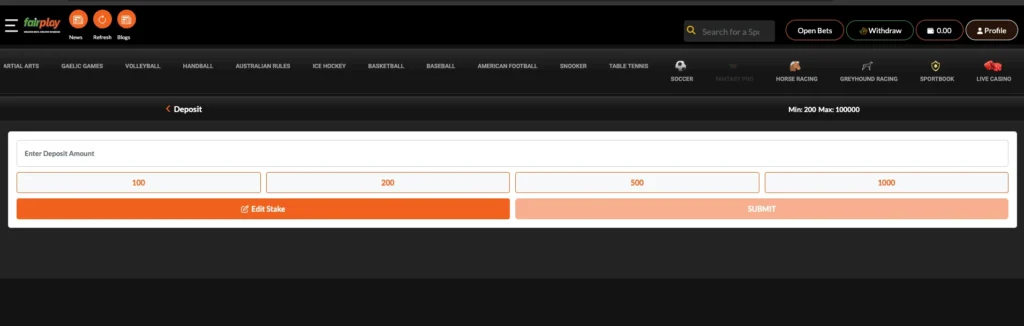
FairPlay applies deposit limits at multiple levels — per transaction, daily, weekly, and monthly. These limits exist to comply with responsible gaming guidelines and payment gateway policies. The specific limits may vary slightly depending on your account verification level.
| Limit Type | Amount (INR) | Notes |
| Minimum Deposit | 100 | Applies to all payment methods |
| Maximum per Transaction | 95,000 | UPI limit set by NPCI per transaction |
| Daily Deposit Limit | 1,00,000 | Cumulative across all payment methods |
| Weekly Deposit Limit | 3,00,000 | Resets every Monday 00:00 IST |
| Monthly Deposit Limit | 10,00,000 | Resets on 1st of each month |
| KYC Threshold | 10,000 cumulative | KYC may be triggered above this level |
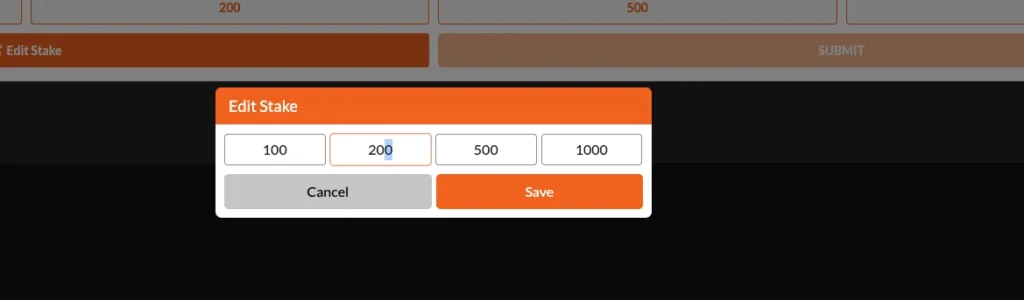
Note: UPI transactions are capped at INR 1,00,000 per transaction by NPCI regulation regardless of FairPlay’s own limits. Bank transfers (RTGS/NEFT/IMPS) can accommodate higher single-transaction amounts where your bank permits. If you need to deposit more than the per-transaction UPI limit, split the deposit into multiple transactions.
All FairPlay Deposit Methods Explained
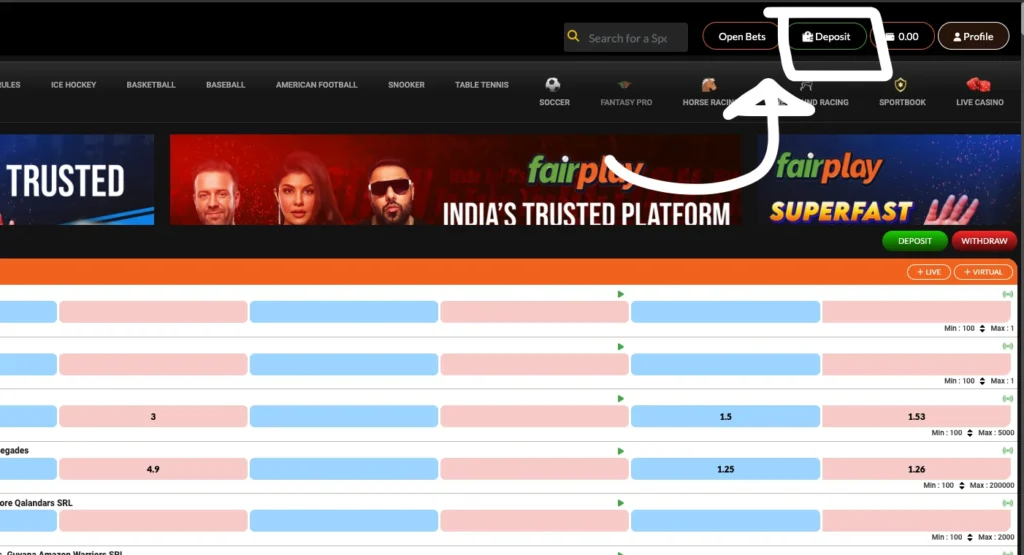
UPI Deposits
UPI (Unified Payments Interface) is the most popular and fastest deposit method on FairPlay. It is supported across all major UPI-enabled apps and works 24/7 including public holidays.
Supported UPI Apps: Google Pay, PhonePe, Paytm, BHIM, Amazon Pay, and any bank’s UPI app.
Processing Time: Typically instant — credits to wallet within 30 seconds of payment confirmation.
Transaction Limit: Up to INR 1,00,000 per transaction (NPCI-mandated limit).
Advantages of UPI deposits:
- Instant crediting with no processing delays
- No additional fees charged by FairPlay
- Works round the clock including bank holidays
- One-time UPI PIN entry — no card details to enter
Common UPI errors:
- UPI ID not found — double-check the FairPlay UPI ID before sending
- Transaction declined by bank — ensure daily UPI limit on your bank app is not exceeded
- Payment pending — UPI server congestion; wait 10 minutes before raising a dispute
- Incorrect amount — always match the amount shown on the FairPlay deposit screen exactly
Google Pay Deposits
Google Pay (GPay) is a UPI-based payment method and works seamlessly with FairPlay’s deposit flow.
Setup and payment process:
- On the FairPlay deposit screen, select UPI or Google Pay
- FairPlay displays a UPI ID or QR code
- Open Google Pay on your phone
- Tap “Pay” or scan the QR code
- Enter the exact deposit amount
- Authorise with your UPI PIN
- Return to FairPlay — balance updates within seconds
Processing Speed: Instant under normal network conditions.
Failed Transaction Handling: If a GPay transaction fails but money is debited, the amount is auto-reversed by your bank within 3 to 5 business days. Screenshot the transaction reference from GPay’s history and share it with FairPlay support if the reversal does not occur.
PhonePe Deposits
PhonePe works the same way as Google Pay on FairPlay — through the UPI rails.
Payment flow:
- Select UPI on the FairPlay deposit screen
- Note the FairPlay UPI ID or scan the QR code
- Open PhonePe and go to “Pay” or “Scan & Pay”
- Enter the deposit amount and your UPI PIN
- Wallet updates within 30 seconds
Common PhonePe issues:
- PhonePe daily limit exceeded — PhonePe has its own daily UPI limit (up to INR 1 lakh); check your PhonePe settings
- Bank server down — PhonePe will show an error; retry after 5 to 10 minutes
- Duplicate payment warning — if PhonePe shows “duplicate transaction”, wait 10 minutes before retrying
Paytm Deposits
Paytm can be used both as a UPI payment method and via the Paytm Wallet if the FairPlay integration supports it.
Deposit workflow:
- On the FairPlay deposit screen, select Paytm or UPI
- Scan the QR code or enter the UPI ID
- In Paytm, choose to pay via Paytm UPI
- Enter amount and authorise
Processing Time: Instant for UPI. Paytm Wallet transfers may take up to 2 minutes.
Bank Transfer Deposits (NEFT / RTGS / IMPS)
Bank transfers are suitable for large deposits or when UPI is not available. FairPlay provides dedicated bank account details for transfers. Always include your FairPlay username or registered mobile number in the payment remarks field.
| Transfer Type | Min Amount | Processing Time | Availability | Best For |
| IMPS | No minimum | Instant (within 30 min) | 24/7 including holidays | Mid to large deposits |
| NEFT | No minimum | Within 2 hours | 24/7 (half-hourly batches) | Non-urgent large transfers |
| RTGS | INR 2,00,000 | Within 30 minutes | Bank working hours only | Very large transfers |
Important: For bank transfers, do NOT send funds without first confirming the current FairPlay bank account details from inside your account dashboard. Bank details can change. Using outdated details can result in funds being sent to the wrong account.
Step-by-Step FairPlay Deposit Process
Follow these steps to make your first or any subsequent deposit on FairPlay.
Step 1 — Log In: Open the FairPlay app or visit the website. Enter your registered mobile number/email and password. If you have not registered yet, complete sign-up and verify your mobile number before proceeding.
Step 2 — Navigate to the Wallet: After logging in, tap the wallet icon at the top of the screen or navigate to Account > Wallet > Add Money. The deposit screen will display available payment methods.
Step 3 — Enter the Deposit Amount: Type the amount you wish to deposit. The minimum is INR 100. Check that the amount does not exceed your daily limit. Bonus offers may have a minimum deposit requirement — check the promotions tab before depositing if you intend to claim a bonus.
Step 4 — Select Payment Method and Complete Payment: Choose UPI, Google Pay, PhonePe, Paytm, or Bank Transfer. For UPI, you will be shown a UPI ID or QR code. Open your UPI app, complete the payment, and return to FairPlay. For bank transfers, note down the account details and payment reference number shown on screen before leaving the FairPlay app.
Step 5 — Confirm Receipt: Your FairPlay wallet balance should update within seconds (UPI) or within the transfer processing time (bank). Go to Wallet > Transaction History to verify the credit. If the balance does not update within the expected timeframe, refer to the troubleshooting sections below.
How Long Does a FairPlay Deposit Take?
Processing times vary by payment method. The table below summarises typical and maximum expected times.
| Payment Method | Typical Time | Maximum Expected Time | Notes |
| UPI (any app) | Under 30 seconds | 10 minutes | Delays occur during peak hours or bank downtime |
| Google Pay | Under 30 seconds | 10 minutes | Same UPI rails as other UPI apps |
| PhonePe | Under 30 seconds | 10 minutes | PhonePe may show processing for up to 5 minutes |
| Paytm UPI | Under 1 minute | 15 minutes | Paytm Wallet credits may take slightly longer |
| IMPS | 5 to 30 minutes | 2 hours | Weekend/holiday IMPS still processes 24/7 |
| NEFT | 30 minutes to 2 hours | 4 hours | Batch-based; longer during off-peak hours |
| RTGS | 15 to 30 minutes | 2 hours | Only available during bank working hours |
Why delays happen: Bank servers handle millions of transactions simultaneously. During peak periods (evenings, weekends, payday dates), UPI transactions can queue, causing delays beyond the typical 30-second window. These delays are on the banking side, not FairPlay’s — and the funds will still arrive once the payment clears.
Why FairPlay Deposits Fail
Understanding the root cause of a failed deposit allows you to fix it faster and avoid repeat failures.
| Issue | Cause | Fix |
| Wrong UPI ID | Typo or outdated UPI ID entered | Copy-paste the UPI ID from the FairPlay deposit screen; never type manually |
| Incorrect amount | Amount entered in UPI app does not match FairPlay screen | Always use the exact amount shown on FairPlay |
| Network issues | Poor internet at time of transaction | Ensure stable connection; retry on WiFi |
| Bank verification failure | Bank security flag on transaction | Approve the transaction via your bank app notification or net banking |
| Bank downtime | Scheduled or unscheduled bank maintenance | Try a different UPI app linked to a different bank |
| Daily limit exceeded | You have hit your bank or FairPlay daily limit | Wait for the limit to reset or use a different payment method |
| Transaction pending (UPI) | UPI network congestion | Wait 10 minutes; do not retry until pending clears |
| Account mismatch | Name on payment account differs from FairPlay account | Update your profile name or use a matching payment account |
| KYC required | Account flagged for KYC completion | Complete KYC via Account Settings before retrying |
| Wallet limit reached | Your FairPlay wallet has a maximum balance cap | Play and reduce wallet balance before depositing more |
FairPlay Deposit Pending? Here is What To Do
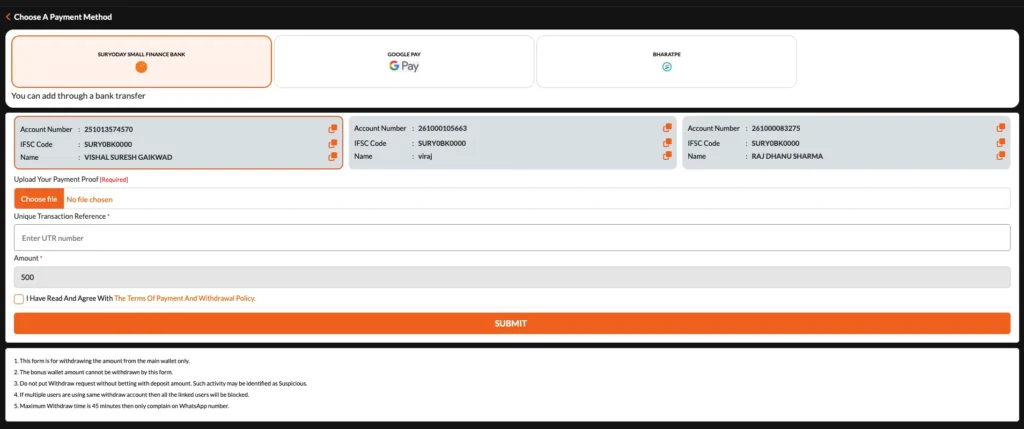
Use this decision-tree guide based on how long your deposit has been pending.
Pending for Under 5 Minutes
Do nothing yet. UPI transactions can take up to 5 minutes during high-traffic periods. Check your bank app to confirm whether the debit has occurred. If no debit has been made, the transaction has not processed — you can safely retry.
Pending for 5 to 30 Minutes
- Check your bank app or UPI app transaction history — has the money been debited?
- If debited: note the UTR (Unique Transaction Reference) number from your bank
- If not debited: the transaction failed silently — you can retry safely
- Do not make another deposit for the same amount until you confirm the first one failed
Pending for 30 Minutes to 1 Hour
- If debited from your bank: collect the UTR/transaction ID from your bank app
- Go to FairPlay Help/Support and raise a deposit query
- Provide: your registered mobile, deposit amount, date/time, UTR number, and screenshot of bank debit
- FairPlay support can manually verify and credit confirmed transactions
Pending for Over 24 Hours
- This is beyond normal processing windows for any payment method
- If money was debited: contact FairPlay support immediately with full transaction details
- Also contact your bank to check if a reversal is in progress
- For UPI transactions over 24 hours, you can also raise a dispute via the NPCI UPI complaint portal
- Keep all transaction screenshots, UTR numbers, and bank statements handy
How To Verify a Successful Deposit
After completing a deposit, verify it using the following methods:
Check Wallet Balance
On the FairPlay home screen or app dashboard, your current wallet balance is displayed at the top. After a successful deposit, this number increases by the deposited amount. Refresh the page or reopen the app if the balance does not update immediately.
Transaction History
Navigate to Account > Wallet > Transaction History. Successful deposits appear as credits with the date, time, amount, and payment method. If a transaction is not listed here after 10 minutes, it has either not been processed or is still pending.
Deposit Confirmation
FairPlay sends a deposit confirmation via SMS or in-app notification once the credit is processed. Check your registered mobile number for an SMS confirmation. These notifications are sent automatically — you do not need to trigger them manually.
Reference Numbers
Every successful FairPlay deposit is assigned an internal reference number visible in Transaction History. For UPI deposits, the NPCI UTR number is also recorded. Always save your payment UTR number from your bank app immediately after payment — this is the most important reference for any dispute.
Common Deposit Mistakes Users Make
| Mistake | What Happens | How to Avoid |
| Sending to the wrong UPI ID | Money goes to another account permanently | Always copy-paste; verify the ID matches exactly |
| Wrong payment method | Transaction fails or goes to wrong system | Select the method on FairPlay first, then open your payment app |
| Making multiple retries while first is pending | Duplicate deposits — all will be credited | Wait for the first transaction to fully fail before retrying |
| Not noting the UTR number | Cannot raise dispute without transaction reference | Screenshot your payment app immediately after paying |
| Depositing before KYC when required | Deposit credited but withdrawal blocked until KYC done | Complete KYC before depositing large amounts |
| Not matching profile name to bank name | Deposit may be flagged for manual review | Ensure your FairPlay profile name matches your bank account name |
| Depositing from someone else’s account | Deposits from third-party accounts may be rejected | Always use a payment method in your own name |
FairPlay Deposit Security
Transaction Protection
All FairPlay deposit transactions are processed through certified payment gateways that use 256-bit SSL encryption. Your card or bank details are never stored by FairPlay directly — all payment data is handled by the payment gateway.
Account Verification
FairPlay uses two-step login verification for account access. Always enable two-factor authentication (2FA) in your account settings to prevent unauthorised deposits or withdrawals even if your password is compromised.
Fraud Prevention
FairPlay’s system flags unusual deposit patterns — such as multiple rapid deposits from different accounts or amounts that deviate significantly from your typical transaction size. If your account is flagged, you may be asked to verify your identity before the deposit is credited.
Safe Payment Practices
- Never share your FairPlay login credentials with anyone
- Never deposit via a third-party agent or unofficial channel — only use the official FairPlay app or website
- Verify the FairPlay website URL before entering login details (look for https and the correct domain)
- Do not use public WiFi to make deposit transactions
- Report any suspicious activity or unrecognised deposits to FairPlay support immediately
FairPlay Deposit FAQs
How long do FairPlay deposits take?
UPI deposits are usually processed instantly and are often reflected within seconds. IMPS transfers generally take a few minutes, while NEFT transactions may require additional processing time depending on banking hours.
What is the minimum deposit on FairPlay?
The minimum deposit amount is typically INR 100, making it easy for users to add funds without committing a large amount upfront.
What is the maximum deposit on FairPlay?
Deposit limits can vary depending on the payment method used. UPI transactions are generally subject to NPCI limits, while bank transfer methods may support higher amounts.
Can I use UPI to deposit on FairPlay?
Yes. FairPlay supports popular UPI payment applications such as Google Pay, PhonePe, Paytm, BHIM, and various banking apps that operate on the UPI network.
Why is my FairPlay deposit pending?
A pending deposit is often caused by temporary bank processing delays, UPI network congestion, or payment gateway synchronization issues. Most transactions are resolved automatically within a short period.
How do I verify a deposit was successful?
You can confirm a successful deposit by checking your wallet balance and transaction history. A payment confirmation message may also be sent to your registered contact details.
Can I cancel a FairPlay deposit?
Once a payment request has been completed through UPI or bank transfer, it generally cannot be cancelled. If a transaction fails, the bank typically processes a refund automatically.
Why was my deposit rejected?
Deposit rejections can occur due to incorrect payment details, account verification requirements, exceeded transaction limits, or temporary payment gateway issues.
Can I deposit multiple times in a day?
Yes. Users can make multiple deposits throughout the day, provided they remain within the applicable daily transaction limits.
Which deposit method is fastest on FairPlay?
UPI is generally the fastest deposit method because transactions are processed in real time and funds are usually credited almost instantly.
Is there a deposit fee on FairPlay?
FairPlay typically does not charge users a fee for making deposits. However, certain banks or payment providers may apply their own service charges depending on the transaction type.
Can I deposit using a credit card?
Available payment methods may vary. Users should check the deposit section within their account to see the most current funding options supported on the platform.
What should I do if my deposit is debited but not credited?
Keep a record of your transaction reference number and contact customer support with the payment details if the funds do not appear after a reasonable waiting period.
Can I deposit from someone else’s bank account?
For account security and verification purposes, deposits are generally expected to originate from a payment method registered in the account holder’s name.
Does FairPlay accept Paytm deposits?
Yes. Users can complete deposits through Paytm using the UPI payment option available within the deposit section.
What happens if I enter the wrong amount?
Submitting a different amount than the one displayed during the deposit process may result in transaction delays or manual verification requirements.
How do I deposit on the FairPlay app?
Open the application, navigate to the wallet section, select the add funds option, choose a payment method, enter the desired amount, and complete the transaction process.
What is the FairPlay UPI ID?
The UPI ID used for deposits is displayed within the official deposit section of your account. Users should always verify payment details directly inside the platform before making a transaction.
Can I deposit using net banking?
Users can generally fund their accounts through supported banking methods such as IMPS, NEFT, or other available bank transfer options.
Why is my deposit option not showing?
This may happen due to account verification requirements, temporary technical maintenance, or platform-related issues. Logging out and signing in again often resolves minor display problems.
Is FairPlay deposit safe?
Deposits are typically processed through secure payment systems designed to protect transaction information and reduce unauthorized access risks.
How do I find my deposit transaction history?
Your transaction history can usually be accessed through the wallet or account section, where deposits, withdrawals, and other account activities are recorded.
What is the FairPlay daily deposit limit?
Daily deposit limits may vary depending on the payment method, account status, and platform policies. Users can view their applicable limits within the deposit section.
Can I deposit without KYC on FairPlay?
Some account functions may be accessible before verification, but completing KYC helps prevent account restrictions and ensures smoother transaction processing.
What if I deposit to the wrong account?
If funds are sent to an incorrect payment destination, contact your bank immediately and provide the transaction details. Recovery options depend on the payment provider’s policies.
Can I deposit using Google Pay on FairPlay Pro?
Yes. Google Pay transactions operate through the UPI network and are commonly supported for account funding.
How do I use FairPlay login to access my wallet?
After logging in with your registered credentials, the wallet section can be accessed through the account dashboard or navigation menu.
Are there limits on how many deposits I can make per day?
Most platforms focus on total daily deposit limits rather than limiting the number of individual transactions.
What is the FairPlay wallet?
The wallet serves as the central account balance area where deposits are credited and transaction records are maintained.
What should I do if my UPI app shows payment successful but my wallet is not updated?
Wait a few minutes for payment synchronization to complete. If the balance remains unchanged, save the transaction reference number and contact support for assistance.