
Fairplay Forgot Password – Reset Your Login Access in Minutes
Forgot your Fairplay password or cannot remember your Fairplay login ID? You are not alone. it happens to many users, and recovering access is easier than you think. This complete guide walks you through every step of the Fairplay forgot password process, explains what to do if your registered number or email is no longer accessible, and helps you get back into your account securely. Whether you forgot your Fairplay ID, password, or both this page has the answer.
Why You May Have Forgotten Your Fairplay Login Details
It is completely normal to lose track of login credentials, especially if:
- You created your Fairplay account a while ago and have not logged in recently
- You changed your password and did not save the updated one
- You are logging in from a new device for the first time
- Your browser did not save the password correctly
- Someone else set up the account on your behalf
In all these cases, the Fairplay forgot password feature allows you to recover full access without contacting support — as long as you have access to your registered mobile number or email address.
Step-by-Step – How to Reset Your Fairplay Password
Follow these steps exactly to complete the Fairplay password reset process:
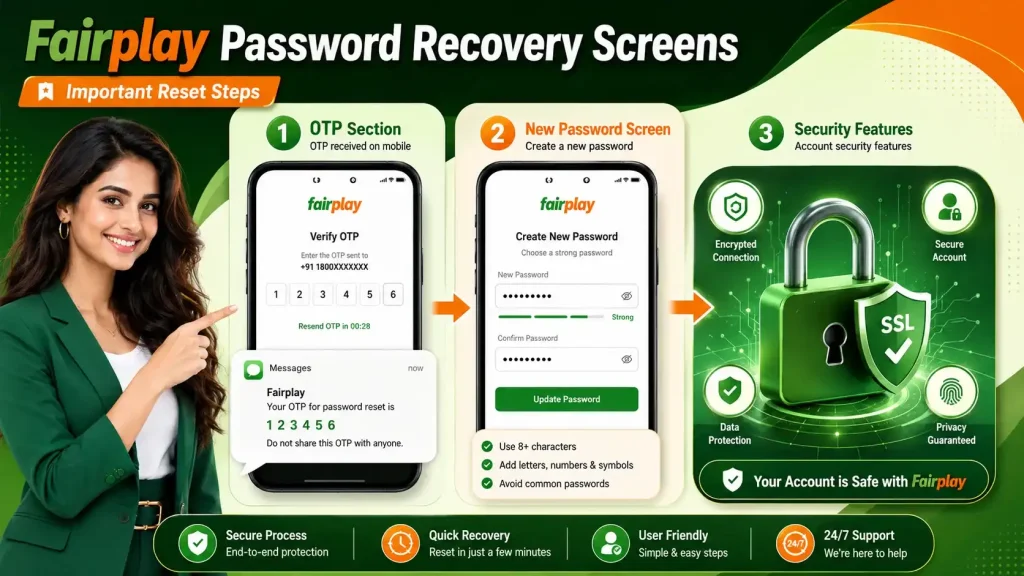
![Fairplay forgot password step [1-6] on mobile](https://fairplay7.win/wp-content/uploads/2026/06/fairplay-forgot-password-1024x576.webp)
Step 1 – Go to the Official Fairplay Login Page
Visit the official Fairplay platform and click on the Login button at the top of the page. Do not use any third-party or unofficial links — always access Fairplay directly through the verified website or official app.
Step 2 – Click on “Forgot Password”
Below the password input field, you will see a “Forgot Password?” link. Click or tap on it. This will open the account recovery section where you can begin the reset process.
Step 3 – Enter Your Registered Mobile Number or Email ID
Type in the mobile number or email address that you used when creating your Fairplay account. This must be the same contact detail linked to your account — the system will verify it before sending any reset instructions.
Step 4 – Receive and Enter Your OTP
You will receive a one-time password (OTP) on your registered mobile number or a reset link on your email. Enter the OTP in the field provided within the time limit shown on screen. OTPs are typically valid for 5 to 10 minutes.
Important: Never share your OTP with anyone. Fairplay support will never ask for your OTP.
Step 5 – Create a New Fairplay Password
Once your identity is verified, you will be prompted to set a new password for your Fairplay account. Choose a strong password that:
- Is at least 8 characters long
- Includes uppercase and lowercase letters
- Contains at least one number
- Includes at least one special character (e.g. @, #, $)
Step 6 – Log In with Your New Password
After saving your new password, you will be redirected to the login page. Enter your Fairplay ID and new password to access your account. Your account balance, history, and preferences will all be exactly as you left them.
Forgot Your Fairplay ID? Here’s What to Do
If you have forgotten your Fairplay login ID itself not just the password. here are your options:
| Situation | What to Do |
|---|---|
| You registered with a mobile number | Use your mobile number as the login ID |
| You registered with an email | Enter your email address as the login ID |
| You do not remember which one you used | Try both — mobile first, then email |
| Neither works | Contact Fairplay customer support with your registered details |
Most users find that their registered mobile number is their Fairplay ID. Try logging in with your phone number before assuming your ID is lost.
What If You No Longer Have Access to Your Registered Number or Email?
This situation requires direct assistance from the Fairplay support team. Here is what you should prepare before contacting them:
- Your full name as registered on the account
- Approximate date of account creation
- Your last known deposit or withdrawal amount
- The device you most recently used to log in
Fairplay’s support team will verify your identity through these details and help you recover or transfer your account securely.
Don’t Have a Fairplay Account Yet?
If you landed on this page because you thought you had an account but cannot find it — or if you are a new user — you can create a fresh Fairplay account in under 2 minutes.
Here is what you get when you register:
- Instant access to sports betting and live casino
- Welcome bonus for new members
- Secure wallet with fast deposit and withdrawal
- Available on mobile and desktop
Already have an account and just remembered your password? Go to Fairplay Login
Tips to Never Forget Your Fairplay Password Again
Once you have successfully reset your Fairplay password, follow these best practices to avoid the same issue in the future:
- Use a password manager — tools like Google Password Manager or your phone’s built-in keychain can save and autofill your credentials securely
- Enable biometric login — if you use the Fairplay app, activate fingerprint or face ID login so you never need to type a password
- Write it down safely — store your password in a secure offline location, never in a chat message or note app
- Do not reuse passwords — avoid using the same password as other platforms to reduce risk
- Update periodically — change your Fairplay password every 3 to 6 months for added security
Fairplay Password Security – What You Need to Know
Your Fairplay account holds your wallet balance, betting history, and personal information. Protecting it matters. Here is how the platform protects you:
| Security Feature | What It Does |
|---|---|
| SSL Encryption | Encrypts all data entered during login and reset |
| OTP Verification | Confirms only the account owner can reset credentials |
| Session Timeout | Automatically logs you out after inactivity |
| Failed Login Lockout | Temporarily blocks access after repeated wrong attempts |
| Secure Password Standards | Enforces strong password requirements on reset |
These protections mean that even if someone knows your old password, they cannot complete a reset without access to your registered phone or email.
FAQs About Fairplay Forgot Password
How do I recover my Fairplay forgot password?
Go to the official Fairplay login page and click “Forgot Password?” Enter your registered mobile number or email, receive an OTP or reset link, verify your identity, and create a new password. The entire process takes less than 3 minutes and does not require contacting customer support.
What should I do if I forgot my Fairplay ID?
Your Fairplay ID is usually your registered mobile number or email address. Try entering your mobile number first on the login page. If that does not work, try your email. If neither works, contact Fairplay customer support with your account details for manual verification.
Can I reset my Fairplay password without my registered mobile number?
If you no longer have access to your registered mobile number, you may be able to use your registered email address for the reset. If neither is accessible, you will need to contact Fairplay customer support directly. Provide your full name, account creation details, and recent transaction history to verify your identity and regain access.
Is the Fairplay forgot password process safe?
Yes. The Fairplay password reset process is secured with OTP-based identity verification and SSL encryption. No one — including Fairplay support — will ever ask for your OTP. The reset link or OTP expires within minutes of being sent, meaning it cannot be reused even if intercepted. Always complete the password reset on the official Fairplay website or app only.
How long does it take to reset a Fairplay password?
Resetting your Fairplay password takes approximately 2 to 3 minutes from start to finish. The OTP or reset link is delivered almost instantly to your registered contact. Once you receive it, you have 5 to 10 minutes to complete the process before it expires and you need to request a new one.