
FairPlay Forgot Password: Complete Account Recovery Guide for Login, OTP & Password Reset Issues

You’re locked out. The match starts in twenty minutes, your wallet has funds sitting in it, and the FairPlay login screen just keeps throwing errors at you. That specific kind of panic — staring at a “incorrect password” message while IPL notifications pile up on your screen — is exactly what this guide is written for.
The good news is that almost every FairPlay Win Forgot Password situation has a clear fix. Most users recover full account access within five to fifteen minutes once they follow the right steps in the right order. The problems usually aren’t complicated — they’re just poorly explained by generic support pages that assume you have all day to troubleshoot.
This guide doesn’t assume that. It’s written for someone on a phone, probably frustrated, needing real answers fast.
Let’s get into it.
Table of Contents
Why FairPlay Password Reset Issues Happen
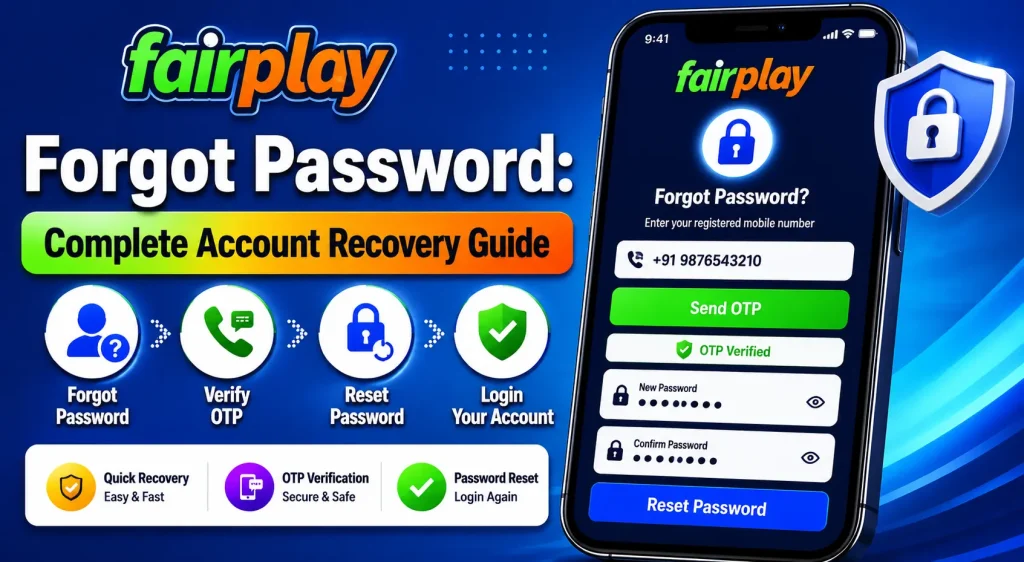
Understanding why you’re locked out helps you pick the right fix instead of wasting time on steps that won’t work for your situation.
Forgotten passwords are the most obvious reason, but they’re rarely the whole story. Most people who think they’ve forgotten their password actually entered it correctly — they just got locked out because of repeated failed attempts before they found the right one. The platform registers those attempts and responds with a temporary hold.
Session expiration is another common culprit that people overlook. If you were logged in on the Fairplay App a few days ago, closed it without logging out, then came back — the session token has likely expired. The app might autofill your credentials and still fail because it’s trying to validate a dead session rather than a fresh login.
Device switching causes more problems than most users expect. If you logged in on your laptop last time and now you’re trying the Fairplay App on a new or recently reset phone, the platform may not immediately recognize the device. This can trigger an additional verification layer or a temporary hold on login attempts.
App reinstallation is a surprisingly frequent cause of password confusion. When you reinstall the Fairplay App, any locally cached credentials are wiped. If you had the app remembering your password and never actually memorized it, you’re now relying on a reset to recover access — which is fine, just plan for it to take a few minutes.
Repeated failed logins are the most controllable issue. Three or four wrong password attempts in quick succession will trigger the platform’s automated login protection. It’s not a punishment — it’s a standard security response designed to block brute-force attacks. But it catches frustrated legitimate users in the crossfire all the time, especially during high-traffic windows like IPL evenings.
Suspicious login behavior is the one that confuses people most. If you suddenly log in from a different city, switch from mobile data to a VPN, or attempt login from a browser you’ve never used with your account, FairPlay security systems may flag the session. The platform has behavioral detection running in the background. It’s comparing your current attempt against your historical login patterns. A mismatch doesn’t mean you’re blocked permanently — it usually means you need to verify via OTP before access is restored.
All of these lead back to the same solution path: FairPlay password reset through the official forgot password flow. The steps are consistent; the complications usually sit in the OTP delivery stage, which we’ll cover in depth below.
Step-by-Step FairPlay Password Recovery Process
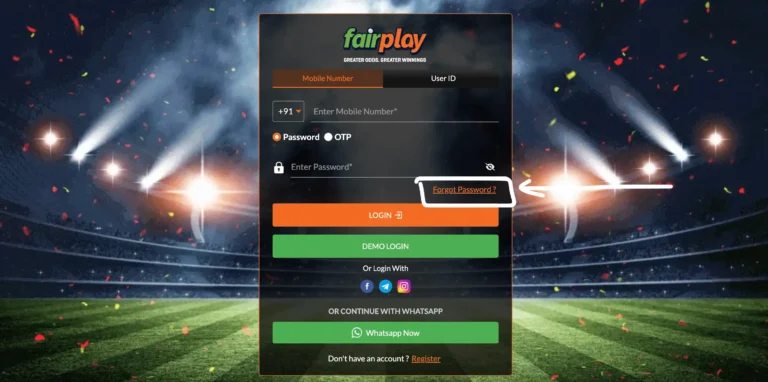
Before starting, make sure you’re on a stable internet connection. Not because the reset itself is data-heavy, but because OTPs time out fast — usually within two to five minutes — and a slow connection can cause the verification screen to reload mid-entry, invalidating the code you just received.
Step 1: Open the official FairPlay login page
Go directly to the official FairPlay platform — either through the Fairplay App or the web browser version. Don’t use saved bookmarks that you haven’t verified recently. Phishing clones of betting platforms exist and they’ll harvest whatever credentials you type. If you’re unsure, search for Fairplay Club through a fresh browser session and verify the URL before entering anything.
Step 2: Tap “Forgot Password”
This link is usually below the password field on the login screen. On the Fairplay App, it may appear as a small text link rather than a button. Tap it once and wait for the redirect — don’t tap multiple times, as that can queue multiple OTP requests simultaneously, which creates its own problems (covered in the OTP section below).
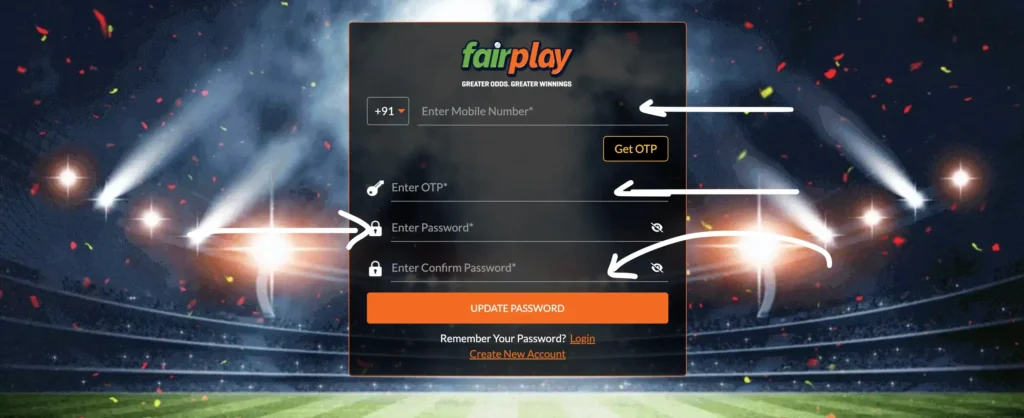
Step 3: Enter your registered mobile number
Type your number exactly as it was registered. If you registered with a +91 country code, make sure the field is accepting that format. Some versions of the form auto-add the country code and get confused if you type it manually. If you registered with a number that’s no longer active, jump ahead to the account recovery without mobile number section.
Step 4: Request the OTP
Hit the send button once. Then wait. This is where most people start spiraling — they expect the OTP in ten seconds, don’t see it in thirty, tap “resend” again, and end up with three OTPs in their inbox while the system only accepts the latest one. Wait at least sixty seconds before considering a resend.
Step 5: Enter the OTP immediately when it arrives
OTPs on FairPlay expire quickly. Enter it the moment you receive it. Don’t switch apps to check something else, don’t lock your screen mid-entry. If the code expires before you submit it, you’ll need to request a new one and start the timer again.
Step 6: Create a new password
Choose something that you won’t reuse across other platforms. A strong betting platform password should be at least ten characters, include a mix of letters, numbers, and at least one symbol. Avoid using your name, phone number, or anything related to your UPI PIN — those patterns are obvious and genuinely put your betting wallet at risk.
Step 7: Log in with the new password
Use the new credentials immediately. If the app or browser session is still showing the old login state in the background, force-close and reopen before attempting. Old cached sessions can create a confusing loop where the app “remembers” your old failed state.
FairPlay OTP Not Received? Real Fixes That Actually Work
This is where most password recovery attempts stall. The OTP simply doesn’t arrive, and users are left waiting, repeatedly hitting resend, and getting more frustrated by the minute. Here’s what’s actually happening and how to fix each specific cause.
IPL Traffic Overload on SMS Gateways
During peak IPL match hours — typically 7 PM to 11 PM on match days — FairPlay along with dozens of other platforms is hammering the same SMS gateway infrastructure with verification codes for hundreds of thousands of users simultaneously. SMS delivery during these windows can be delayed by anywhere from two to fifteen minutes. This isn’t a FairPlay problem specifically; it’s a shared telecom infrastructure problem.
If you’re trying to recover your account during an IPL match evening, factor in this delay. Request the OTP once, then wait a full five minutes before requesting another. Stacking multiple OTP requests during gateway congestion just puts you further back in the queue.
Telecom Provider SMS Delays
Even outside peak windows, certain mobile carriers handle SMS delivery with noticeable lag. Postpaid users on major networks generally receive OTPs faster than prepaid users in congested areas. If you’re in a semi-urban or rural area with weak signal, the SMS may be delayed at the carrier level regardless of how fast the platform sent it.
Try toggling your phone into airplane mode for fifteen seconds, then back to normal. This forces your device to re-register on the nearest tower, which sometimes flushes a stuck SMS delivery queue and allows delayed messages to arrive.
DND Filters Blocking Verification SMS
This one catches people completely off guard. If your mobile number is registered under the national Do Not Disturb registry with a transactional SMS block, OTPs from certain senders can be silently filtered. You won’t see the message. No notification, no delivery failure — it just disappears.
Check your DND settings through your carrier’s app or USSD code. For FairPlay OTP not received situations where you’re on DND, you may need to whitelist the sender or temporarily adjust your DND preferences. Alternatively, reach out through WhatsApp support if the platform offers OTP delivery via that channel.
Multiple OTP Requests Invalidating Previous Codes
Every time you request a new OTP, the previous one becomes invalid. If you’ve tapped “resend” three times out of frustration, you now have three codes floating toward your phone — and only the last one works. This creates a situation where the first two arrive quickly but are already dead, and you waste them trying to log in before the valid third one even arrives.
Solution: request once, wait two full minutes, and only resend if nothing arrives after that window.
Dual SIM Confusion
If your phone has two SIMs and your registered number is on SIM 2, but your default SMS SIM is SIM 1, some Android configurations route the OTP to the wrong SIM slot or display it in a way that’s easy to miss. Check your notification shade carefully. The message may have arrived on a SIM you’re not actively checking.
App Cache Interfering with OTP Entry Screen
Sometimes the OTP screen itself is the problem. If the Fairplay App has stale cache data, the verification input field can freeze, fail to register keystrokes, or auto-submit incorrectly. If you suspect this, force-close the app, clear its cache from your phone’s app settings (not uninstall — just cache), reopen, and begin the password reset flow again.
SMS Gateway Retry Window
Most platforms, including FairPlay, have a mandatory cooldown between OTP resend attempts. If you hit resend too quickly, the system may silently ignore your request rather than sending another code. The countdown timer on screen is your guide — don’t bypass it by refreshing or navigating away and back.
Why FairPlay Account Gets Temporarily Locked
A FairPlay account locked situation feels alarming, especially when your balance is sitting in the wallet. Understanding what triggered it helps you know how long to wait and what to do next.
Failed login attempts are the primary trigger. Most platforms lock an account — either temporarily or with a verification requirement — after five to seven consecutive failed attempts within a short window. The exact number varies and isn’t published, but the behavior is consistent: too many wrong attempts in a row, and the system puts a hold on further login attempts from that device or IP.
The lock is almost always temporary. Standard cooldown periods are fifteen minutes to one hour. You don’t need to contact support in most cases — waiting it out and then using the correct password or completing the FairPlay password reset flow is sufficient.
Suspicious behavior detection is the more complex trigger. If the platform’s security system notices login attempts from multiple locations in a short timeframe, unusual device changes, or login patterns that don’t match your history, it may apply a protective hold even if you entered the right password. This is a genuine security feature — it’s the same logic that makes your bank freeze your card when someone uses it in a different city.
In these cases, the hold usually requires OTP verification or occasionally a brief support interaction to confirm your identity.
VPN usage is a specific behavior that triggers this detection frequently. If you regularly log in from Mumbai and suddenly attempt login through a VPN exit node in Singapore, the geographic mismatch is flagged. FairPlay and most betting platforms actively discourage VPN usage, and some reject VPN-based logins outright. If you’ve been using a VPN and found yourself locked out, disable it entirely before attempting the reset flow.
Automated bot detection can also catch legitimate users. If you were using any browser automation tool, script, or even an aggressive ad blocker that modifies network requests, the platform’s bot detection may have flagged your session. Clear all browser extensions, use a clean incognito window, and try the standard flow.
Your wallet balance is safe throughout any temporary lock. Account locks are access controls, not account closures. The funds don’t go anywhere.
How to Recover FairPlay Account Without Mobile Number
This is a more serious situation, but it’s not hopeless. If your registered mobile number is no longer active — you changed carriers, lost the SIM, or the number was reassigned — you’ll need to go through a manual verification path.
Registered email recovery is the first option. If you provided a valid email address during registration and have access to it, the FairPlay account recovery process via email is usually available. The platform sends a reset link or temporary access code to that address. Check your spam folder — transactional emails from betting platforms frequently land there.
WhatsApp support escalation is often the most practical path. Most Indian betting platforms, including FairPlay, offer WhatsApp support as a primary contact channel. Explain your situation clearly: your registered number is no longer active, you need account recovery, and you’re willing to go through manual verification.
When you contact support, have the following ready: your registered name as it appears in the account, the approximate registration date, your last deposit amount and method, the UPI ID or bank account linked to the wallet, and if your KYC verification was completed, the document type you submitted.
KYC verification is your strongest recovery asset. If you went through the full document verification process — uploaded Aadhaar, PAN, or other identity proof — the support team can cross-reference your identity claim against those records. This is a meaningful reason to complete KYC even if it wasn’t mandatory at your deposit level.
Transaction proof also helps significantly. Screenshots of past UPI transactions to the platform, or bank statements showing deposits, serve as supporting evidence that you are the legitimate account owner.
Expect manual recovery to take twelve to forty-eight hours depending on support queue volume. During IPL season, queues are longer. Be patient and respond to any follow-up verification requests quickly to avoid delays.
Common Login Problems After Password Reset
Successfully completing the password reset doesn’t always mean smooth sailing back into your account. There are a handful of specific issues that come up frequently after reset.
App stuck loading or login loop is one of the most frustrating post-reset experiences. You enter the new credentials, the app starts loading, and then either freezes or loops back to the login screen without any error message. This is almost always a caching issue. Force-close the Fairplay App, go to your phone’s app settings, clear the cache (not the data — just the cache), and try again. If that doesn’t fix it, clear both cache and data, log in fresh.
“Invalid credentials” despite entering the correct new password can happen when the password reset completes but the app’s local auth token hasn’t refreshed. The app is still trying to validate against an old stored token. Logging out explicitly (if the app allows it from the error state), or uninstalling and reinstalling the app, resolves this in most cases.
Browser session conflict affects users who access Fairplay Login through a browser rather than the app. If you have the platform open in multiple tabs, or your browser is holding a cached session from before the reset, you may get authentication errors even with correct credentials. Open a fresh incognito window and log in there as a clean test.
Missing wallet balance display after login causes immediate panic, but it’s almost always a delayed data sync issue. The balance is still there — the platform just hasn’t refreshed the wallet data yet after the authentication state change. Wait thirty to sixty seconds, pull-to-refresh, or navigate away within the app and come back to the wallet screen.
Delayed bonus visibility is similar. Any active bonuses or promotional credits may not appear immediately after a session change. Give it a few minutes before contacting support about missing bonuses — it’s rarely an actual issue.
Login session timeout during the reset process itself is something to watch for. If you started the forgot password flow on a slow connection and spent too long on any one step, the entire session may expire before you complete the reset. You’ll need to start over. This is why a stable, fast connection matters before beginning.
How to Secure Your FairPlay Account After Recovery
Getting your account back is half the job. What you do next determines whether you’re back in this situation six weeks from now.
Use a password specific to this account. The number one cause of account takeovers on betting platforms isn’t sophisticated hacking — it’s credential stuffing, where leaked passwords from one platform are tried automatically on others. If you used the same password on FairPlay and any other site that’s ever had a data breach, your account was at risk. Create a unique password that you don’t use anywhere else.
Don’t use passwords that mirror your UPI PIN or bank details. This sounds obvious, but under time pressure people often fall back on what’s easy to remember. Your betting wallet connects to real money — treat the password with the same seriousness you’d treat your banking PIN.
Avoid logging in from public or shared devices. Internet cafes, hotel business center computers, and friends’ devices that you use “just once” are genuine risks. Browsers save autofill data, session cookies persist, and you may not always remember to log out. If you must use a shared device, use incognito mode and log out explicitly when done. Verify afterward that the session was actually terminated.
Be very careful about Telegram groups claiming affiliation with FairPlay. There’s a significant volume of scam activity in betting-related Telegram communities where users are asked to share credentials, verification codes, or wallet details in exchange for “bonus claims” or “account assistance.” Legitimate FairPlay support never asks for your password. Never.
Don’t save your password in shared browsers. If multiple people use the same device or browser profile, saved passwords are visible to all of them. Use your personal device’s password manager or simply memorize a strong, unique password.
After recovery, verify your registered details. Once you’re back in your account, check that your registered mobile number, email, and KYC documents are current. If any contact details are outdated, update them while you have full access — it makes the next recovery situation, if it ever happens, dramatically easier.
When to Contact FairPlay Support
Most password reset and login issues can be resolved self-service. But there are specific situations where contacting support is the right call.
Contact support when: your registered number is no longer active, you’ve completed the reset flow multiple times without success, your account shows an unusual status message that isn’t a standard “incorrect password” error, you suspect unauthorized access has occurred, or you’ve been waiting more than twenty-four hours for a manual recovery response you initiated earlier.
What to expect when you contact support: The first response will almost always be a request for verification details. They need to confirm you are the legitimate account owner before taking any action. Provide your registered name, approximate registration date, recent transaction details, and KYC information if applicable. The more specific and accurate your details, the faster the verification proceeds.
How to speed up the process: Be extremely specific in your initial message. Don’t write “I can’t log in, please help.” Write “I am unable to access my account registered under [phone number]. I have completed the FairPlay password reset flow twice but receive an error after OTP entry. I believe my number may have been flagged. I completed KYC with Aadhaar in [month/year].” That level of detail gets you to a resolution faster because support doesn’t have to spend a round-trip extracting basic information from you.
WhatsApp support tends to be faster than email for most Indian users. Response times during peak IPL season can stretch to several hours via email, while WhatsApp usually gets a first response within thirty to sixty minutes during business hours.
What not to do: Don’t send multiple messages in rapid succession. Don’t create a second account to bypass the issue — this violates platform terms and can result in both accounts being suspended. Don’t share any one-time codes, passwords, or wallet PINs with support — legitimate support agents never ask for these.
Frequently Asked Questions About FairPlay Forgot Password
How long does the FairPlay password reset take?
The self-service FairPlay password reset process, when everything goes smoothly, takes three to seven minutes. The main variable is OTP delivery time, which can range from seconds to several minutes depending on your carrier, network conditions, and time of day. During IPL peak hours, add an extra five to ten minutes for potential SMS gateway delays. Manual recovery through support takes twelve to forty-eight hours. If you’re doing self-service recovery, start the process at least thirty minutes before you need access for anything time-sensitive.
Why does FairPlay say my account is temporarily locked?
A FairPlay account locked message typically means the system’s automated protection triggered due to too many failed login attempts, an unusual login pattern, or suspected unauthorized access. In most cases, the lock is temporary — anywhere from fifteen minutes to a few hours — and resolves on its own. Once the cooldown passes, use the forgot password flow rather than retrying the old password, since another round of failed attempts will extend the lock. If the lock message persists beyond a few hours or includes specific language about review or suspension, contact WhatsApp support directly.
What if the FairPlay OTP is not received even after multiple resend attempts?
First, stop requesting new OTPs. After three or four requests, most SMS gateways treat the volume as spam-like behavior and throttle further delivery from your number. Wait five full minutes with no new requests. During that window: toggle airplane mode on and off to refresh your carrier connection, check if you’re on DND with transactional SMS blocked, verify which SIM slot your registered number is in if you have dual SIM, and confirm there’s no network outage in your area. If you’ve done all of this and still have no OTP after a ten-minute wait, contact support via WhatsApp explaining the specific situation — FairPlay OTP not received cases can sometimes be resolved by support initiating a manual verification pathway.
Can I access my FairPlay wallet while my account is locked?
No — wallet access requires a valid login session. However, your balance is completely safe during any temporary lock or recovery process. Account locks are access restrictions, not account actions. Your funds don’t move. Once you recover access through the FairPlay account recovery process, your full wallet balance will be exactly as you left it, including any pending withdrawals that were in process before the lockout.
Why does my FairPlay login keep failing even after I reset the password?
If you’ve genuinely completed the reset and are entering the new password correctly but still failing, there are three likely causes. First, the app may be holding a stale authentication state — force-close and clear cache. Second, you may be using the wrong saved password from a browser autofill that hasn’t updated yet — disable autofill for this field and type the new password manually. Third, in rare cases, a reset confirmation email or screen shows “success” but a backend sync issue means the password change hasn’t fully propagated — waiting five minutes and trying again resolves this. If none of these work, use the Fairplay Login via browser as a clean test environment separate from the app.
Is it safe to do a password reset over mobile data or public WiFi?
Mobile data is generally safe for the reset process, as the platform uses HTTPS encryption. Public WiFi carries more risk — not because password resets are inherently insecure, but because being on shared networks while dealing with betting account credentials is simply poor practice. If you must use public WiFi, do the minimum required, log out immediately when done, and change your password again as soon as you’re on a private connection. For FairPlay and any platform connected to real money, treat your credentials with the same caution you’d apply to mobile banking.
What details does FairPlay support ask for during manual account recovery?
Typical verification requests include: your full registered name, the mobile number originally used for registration, approximate account creation date, recent deposit amount and method, UPI ID or bank account number linked to the account, and if KYC was completed, the document type submitted. Some cases may also ask for the last four digits of the document number or a screenshot of a past transaction. The depth of verification depends on the nature of your recovery situation — losing access to a registered number triggers deeper checks than a standard password reset.