
How to Reset Your FairPlay Login Password

Locked out of your Fairplay Login account? You are not alone. Thousands of players hit a wall every week — a forgotten password, a missing OTP, an expired reset link, or an account that simply refuses to open. The frustration is real, and the clock ticks while your favourite match or casino session waits.
This guide fixes that. Whether you have forgotten your password entirely, lost access to the registered phone number, received no OTP, or found your account locked after too many failed attempts — you will find the exact fix here. We cover the full reset process for both the Fairplay website and the Fairplay app, plus every common failure point and how to clear it fast.
The most common reasons users lose account access include:
- Forgotten password after a device change or long break from the platform
- Typing the wrong credentials repeatedly until the account locks
- OTP that never arrives due to network or spam filter issues
- Expired password reset links left unopened in the inbox
- Changed phone numbers with no account update
- Browser or app cache holding stale login data
- Pending KYC verification blocking the login process
Table of Contents
Why Fairplay Login Password Issues Happen
Before jumping to the fix, it helps to know what caused the problem. Password issues are rarely random — they usually trace back to one of the following root causes.
Forgotten Password
The most straightforward cause. Players who take extended breaks, switch devices, or use auto-fill without ever seeing the actual password are the most vulnerable. When auto-fill stops working — after a browser update, a new phone, or a cache clear — there is no password to fall back on.
Typing Errors and Caps Lock
Passwords are case-sensitive. A single capital letter in the wrong place will trigger a failed login. Most players fail multiple times before realising Caps Lock is on or that the shift key was accidentally held during entry.
Expired or Stale Credentials
Fairplay may prompt users to update passwords periodically for security reasons. If you have not logged in for an extended period, your session token may have expired, requiring a fresh login with your existing credentials — or a reset if those have been forgotten.
Account Locked After Multiple Failed Attempts
Fairplay’s security system automatically locks an account after a set number of consecutive incorrect login attempts. This is a protective measure against brute-force attacks. Once triggered, a standard password entry will not work — you need to reset or contact support.
Device or Browser Issues
Outdated browsers, corrupted cache data, and conflicting cookies can prevent the login page from loading correctly or stop the OTP from being delivered. This is particularly common after browser updates or on shared devices.
Pending Verification or KYC
Accounts that have not completed identity verification (KYC) may face restricted access. If your account was flagged or your KYC was rejected, login may be blocked until the issue is resolved with support.
Fairplay Login OTP Problems
OTP delivery issues are among the most reported login complaints. Common causes include: the message being filtered into spam, temporary carrier delays, an outdated registered number, or network congestion. Some users also request OTP too quickly in succession, which can trigger a cooldown period.
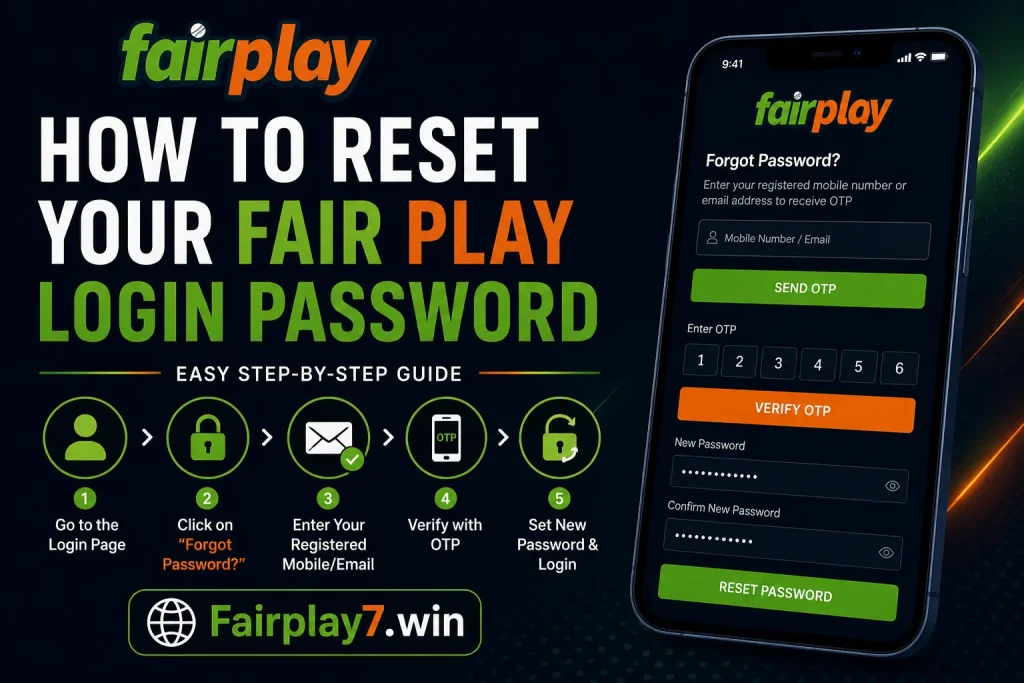
Step-by-Step Fairplay Login Password Reset Process
The process below applies to the official Fairplay website. If you are on the app, skip to the next section. Always start from a trusted link — use the Fairplay Login Guide to reach the correct login page.
- Step 1: Open the Official Fairplay Login Page
Go directly to the Fairplay website using a bookmarked link or a trusted source. Avoid clicking login links from SMS messages or social media, as phishing pages mimic the official site closely. Confirm the URL is correct before entering any details.
- Step 2: Click ‘Forgot Password’
On the login panel, below the password field, you will find the ‘Forgot Password’ or ‘Forgot Username and Password’ link. Click it. Do not attempt more logins at this stage — additional failed attempts can trigger an account lock.
- Step 3: Enter Your Registered Mobile Number or Email
You will be asked to provide the mobile number or email address linked to your Fairplay account at registration. Enter exactly what you used when you signed up — no variations. If you registered with a mobile number, use that; if you used email, use that.
- Step 4: Verify Your Identity Using OTP
Fairplay will send a One-Time Password (OTP) to your registered mobile number via SMS, or a reset link to your email. For SMS: enter the OTP within the time window shown on screen (usually 5 minutes). For email: check your inbox and click the reset link promptly. Check spam or junk folders if nothing arrives within 2 minutes.
- Step 5: Create a Strong New Password
Once verified, you will reach the password creation screen. Your new password must be at least 8 characters long and include a mix of uppercase letters, lowercase letters, numbers, and at least one special character (such as @, #, $, !). Avoid using your name, date of birth, or any personal information. Do not reuse your previous Fairplay password.
- Step 6: Confirm the New Password
Re-enter the same password in the confirmation field. Both entries must match exactly. If they do not match, the system will reject the reset. Take care with characters that look similar (0 vs O, 1 vs l).
- Step 7: Log In with Your New Password
Return to the main Fairplay Login page. Enter your registered mobile number or username along with the new password. All previous sessions are invalidated once you reset — so any devices that were previously logged in will require fresh authentication.
How to Recover Your Fairplay Login ID
Some users do not just forget the password — they also cannot remember the username or login ID they registered with. Here is how to recover it.
Using Your Registered Mobile Number
Most Fairplay accounts use the registered mobile number as the primary login identifier. On the login screen, try entering your phone number instead of a username. In many cases, the mobile number IS the login ID. Confirm this by clicking ‘Forgot Username and Password’ and following the mobile-based recovery flow.
Using Your Registered Email Address
If you registered using an email address, check your inbox for the original Fairplay registration confirmation email. That email typically contains your assigned username or login ID. Search your inbox for terms like ‘Fairplay’, ‘Welcome’, or ‘Account Created’.
Account Identification via Support
If neither method works, you will need to contact Fairplay Customer Care directly. Be ready to provide your full name as registered, date of birth, and any deposit or withdrawal reference numbers linked to the account. This helps the support team locate your account without the login ID.
Fairplay Login ID Recovery Process Summary
- Try mobile number as the login ID first
- Search original registration email for username details
- Use the ‘Forgot Password’ flow to trigger mobile OTP — the number it sends to IS your registered number
- Contact customer support with KYC documents if the above steps fail
Fairplay App Password Reset Process
If you use the Fairplay App Download on Android or any supported mobile platform, the password reset process works the same way — but there are a few app-specific things worth knowing.
Password Reset via the Fairplay App
- Open the Fairplay app on your device
- Tap the Login button on the home screen
- Below the login fields, tap ‘Forgot Password’ or ‘Forgot Username and Password’
- Select ‘Mobile Number’ as your recovery method
- Enter the mobile number you used during Fairplay register
- Tap ‘Send OTP’ (the orange button on most versions)
- Enter the OTP received via SMS
- Create a new strong password and confirm it
- Tap ‘Reset Password’ — you will return to the login screen
- Log in with your mobile number and new password
Android-Specific Considerations
Android users running older versions of the Fairplay app may encounter a slightly different interface. If the ‘Forgot Password’ link is not visible, scroll down on the login screen or try rotating the device to landscape mode to reveal hidden elements.
If the app itself is crashing or not loading the login page properly, the first fix is to uninstall and reinstall from the official source. Visit Fairplay App Download to get the latest verified APK.
Fairplay App Login Issue Fixes
- Update the app to the latest version before attempting a reset
- Clear the app’s cache from your phone settings (Settings > Apps > Fairplay > Clear Cache)
- Ensure your phone has a stable internet connection during OTP verification
- Disable any VPN that may interfere with OTP delivery
- If the OTP screen freezes, close and reopen the app and request OTP again
What To Do If Password Reset Doesn’t Work
The standard reset flow works for most users, but several things can go wrong. Use the troubleshooting table below to identify your specific issue and apply the right fix. For login-related issues beyond password resets, also check Fairplay Login Not Working.
| Problem | Likely Cause | Solution |
| OTP not received | Network delay, spam filter, wrong number | Wait 2 minutes, check SMS spam folder, confirm the registered number is correct, request OTP again |
| Email reset link expired | Links typically expire within 15–30 minutes | Request a new reset link immediately and open it without delay |
| Mobile number changed | Old number no longer active | Contact Fairplay Customer Care with KYC documents to update and recover account |
| Wrong registered email | Email was mistyped at signup | Try all email variations you own; contact support if none work |
| Browser cache/cookie issue | Stale data blocking login page | Clear browser cache and cookies or switch to Incognito mode |
| Login page not loading | DNS issue or site update | Try a different browser, flush DNS, or use the Fairplay app instead |
| Account locked | Too many failed login attempts | Wait 30–60 minutes then reset password; or contact support for immediate unlock |
| Multiple OTP requests failing | Carrier-level OTP block or throttle | Try email recovery instead; contact support if both fail |
| Server/platform issue | Fairplay maintenance or downtime | Wait 15–30 minutes and try again; check Fairplay’s official channels for status |
| Verification failure | Incorrect OTP or expired session | Request a fresh OTP; ensure you enter it without switching apps mid-flow |
How to Secure Your Account After Password Reset
Most guides stop at ‘log in with new password’. That is a mistake. The minutes after a password reset are the best time to lock your account down. Here is what to do immediately.
Create a Genuinely Strong Password
A strong Fairplay password should be at least 12 characters long (not the minimum 8). Use a combination of uppercase and lowercase letters, digits, and special characters. A password like ‘FP#2026Secure!’ is far harder to crack than ‘Fairplay1’. Avoid dictionary words, even with obvious substitutions (like @ for a).
Use a Unique Password for Fairplay
Never reuse passwords across platforms. If one site is breached and you use the same credentials on Fairplay, attackers can access your betting account using those stolen details — a method known as credential stuffing. Your Fairplay password should exist nowhere else.
Enable Two-Factor Authentication (2FA)
If Fairplay offers 2FA on your account, enable it immediately after resetting your password. With 2FA active, even if someone obtains your password, they cannot log in without the second verification step on your registered device.
Log Out From All Shared or Old Devices
After a reset, your previous sessions should be invalidated automatically. But if you previously used Fairplay on a shared computer or someone else’s phone, log out from those sessions manually via your account settings to prevent unauthorised access.
Verify the Website Before Logging In
Always double-check the URL before entering any credentials. Phishing sites that mimic Fairplay are designed to steal your login details the moment you type them. The correct URL will match the official domain exactly — no extra characters, no hyphens in unusual places.
Avoid Saving Passwords in Public Browsers
If you accessed Fairplay from a library, internet cafe, or shared device, do not save your password in that browser. Clear the session data manually before leaving. For your personal device, a reputable password manager is far safer than browser-saved passwords.
When to Contact Fairplay Customer Support
There are situations where self-service recovery simply will not work. Knowing when to escalate saves time. Reach Fairplay Customer Care in the following scenarios:
- Account permanently locked: If your account has been locked due to security flags or multiple violations, only the Fairplay team can unlock it after identity verification.
- Lost access to registered phone number: If your SIM has been changed, deactivated, or lost, OTP-based recovery is impossible. Support can verify your identity via alternative methods such as KYC documents (government-issued ID, PAN, Aadhaar).
- Lost access to registered email: If you no longer have access to the email used during signup, you cannot receive reset links. Contact support with proof of identity and account activity.
- Identity verification disputes: If your KYC was rejected and you cannot proceed, the support team will guide you through the re-submission process.
- Failed account recovery after all steps: If you have tried OTP reset, email reset, and cache clearing without success, escalate immediately. Do not keep attempting — repeated failures may deepen the lock.
Fairplay customer support is available via WhatsApp and live chat. Have your registered name, approximate account creation date, and any transaction reference numbers ready when you contact them. This speeds up identity verification significantly.
Common Password Reset Mistakes Users Make
These errors are surprisingly frequent — and each one can turn a 2-minute fix into a 2-hour headache.
Trying to Reset With an Old Password
Fairplay will reject any new password that matches a previously used one. Users who try to ‘reset’ back to their familiar old password will hit an error without understanding why. Choose something genuinely new.
Sharing the OTP
Fraudsters impersonating Fairplay support representatives often call users and ask for the OTP ‘to verify the account’. Fairplay will never ask for your OTP. The OTP is for your eyes only — sharing it gives complete account access to whoever receives it.
Using Weak Passwords That Get Forgotten Again
Some players set a simple, memorable password after a reset — only to forget it again within days. A short, weak password also increases security risk. Use a password manager to store a complex password so you never need to memorise it.
Ignoring the Spam Folder
Email reset links that land in spam are one of the most common causes of a ‘link not received’ complaint. Always check the spam or junk folder before concluding the email was not sent. Add the Fairplay email address to your contacts to prevent future filtering.
Using Unofficial Websites
Searching ‘Fairplay login reset’ in Google can surface unofficial pages that mimic the real platform. Always navigate directly to the official Fairplay domain. Bookmark the official login page. If you are unsure, use the Fairplay Login Not Working guide to troubleshoot without leaving trusted sources.
Entering the Wrong Mobile Number
Some users have multiple phone numbers and cannot remember which one they registered with. On the reset screen, if your first attempt does not trigger an OTP, try your other numbers before assuming the system has failed. The OTP will only go to the exact number on file.
Frequently Asked Questions
1. How do I reset my Fairplay login password?
Go to the Fairplay login page, click ‘Forgot Password’, enter your registered mobile number or email, verify via OTP or reset link, then create a new password. The full process takes under 5 minutes if your registered contact is accessible.
2. What should I do if I don’t receive the Fairplay login OTP?
Wait 2 minutes and check your SMS spam folder. Confirm your registered mobile number is correct and has network signal. Request the OTP again. If still not received, try email recovery or contact Fairplay Customer Care.
3. Why is my Fairplay login not working after password reset?
Clear browser cache or app cache, then try again. Old session data sometimes conflicts with newly set credentials. If still failing, check Fairplay Login Problems in India for region-specific issues.
4. Can I recover my Fairplay login ID?
Yes. Your login ID is usually your registered mobile number. If you used a username, check your original Fairplay registration email. For complete ID recovery, contact Fairplay Customer Care with your KYC documents.
5. How long does a password reset link remain valid?
Fairplay email reset links typically expire within 15 to 30 minutes of being sent. Open the link as soon as it arrives. If it has expired, return to the login page and request a new reset link.
6. When should I contact Fairplay customer care?
Contact Fairplay Customer Care if: your account is permanently locked, you have lost access to both your registered phone and email, OTP recovery has failed multiple times, or your KYC verification has been disputed or rejected.
Conclusion
Regaining access to your Fairplay account does not need to be complicated. With the right steps — clicking ‘Forgot Password’, verifying via OTP, and creating a strong new password — most users are back in under five minutes. When the standard process hits a wall (OTP not arriving, link expired, account locked), the troubleshooting steps and support escalation paths in this guide will get you through.
If you are setting up a new account or need a fresh start, visit the Fairplay Register page. Need a complete walkthrough of the login process from scratch? The Fairplay Login Guide covers everything step by step. And if you are getting started for the first time, How to Create a Fairplay ID will walk you through the registration process in full.
Take two minutes now to secure your account — enable 2FA, update your registered contact details, and store your new password safely. Future you will thank present you.